Overview
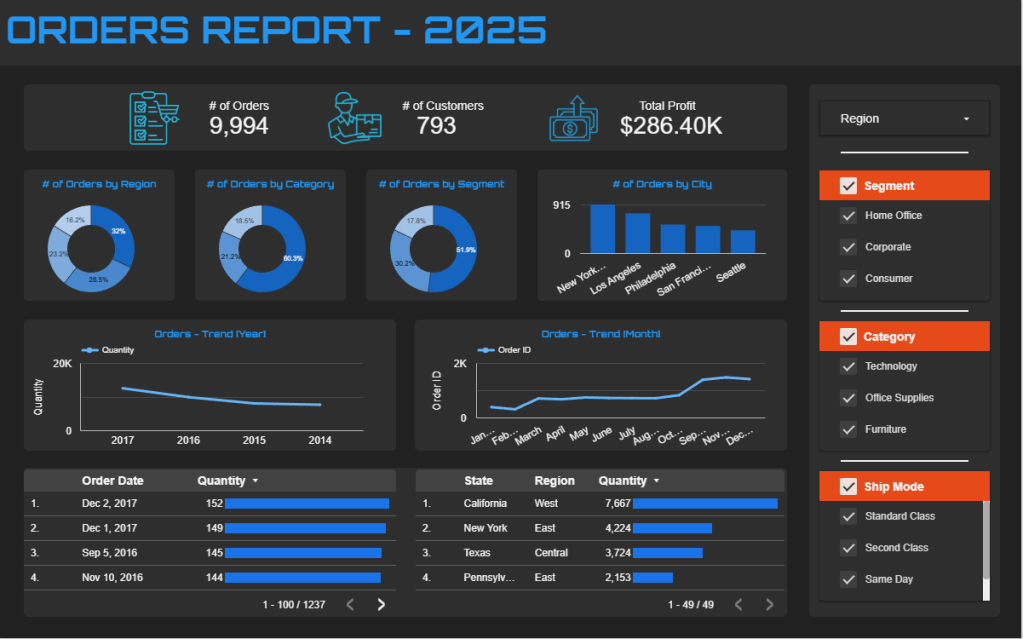
This interactive Looker Studio dashboard provides a comprehensive view of order performance for 2025, combining key metrics, visual breakdowns, and dynamic filters for in‑depth analysis. Users can explore total orders, customer counts, and profitability, with visualizations segmented by region, category, market segment, and city. Trend charts display order activity over time by year and month, while sortable tables reveal detailed order and regional performance. Integrated filter controls allow instant drill‑down by region, segment, category, and shipping mode, enabling stakeholders to quickly identify patterns, track sales performance, and uncover growth opportunities.
KPI Requirement
We will conduct an analysis of vital indicators within our data to extract valuable insights into our business performance. Our focus is on computing the following key metrics:
- Total Orders – Total number of orders placed within the selected date range.
- Total Customers – Unique count of customers who placed orders.
- Total Profit – Sum of profit from all orders.
- Orders by Region – Percentage distribution of orders across regions.
- Orders by Category – Percentage distribution of orders across product categories.
- Orders by Segment – Percentage distribution of orders by customer segment.
- Orders by City – Number of orders from each top city.
- Orders Trend (Year) – Annual trend of orders over time.
- Orders Trend (Month) – Monthly trend of orders within the year.
- Orders by State – Quantity of orders per state.
Data Source (Excel)
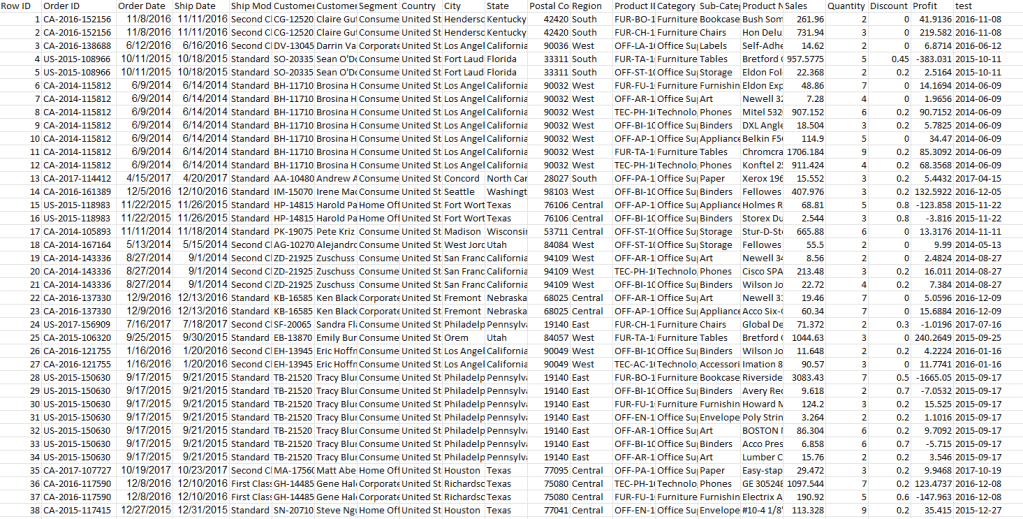
An Excel-based sales dataset containing order, customer, product, and profit details, cleaned and prepared for analysis with standardized date formats and consistent category fields.
Dashboard Creation (Looker Studio)
The Orders Report 2025 dashboard is now fully operational, featuring an overview home page with key sales, customer, and profit metrics, along with detailed visualizations to analyze order trends by region, category, segment, city, and shipping mode. Additional sections highlight yearly and monthly trends, as well as state‑level performance, enabling quick identification of top and underperforming areas.

 Joshua Lamothe