
Overview
You are a junior data analyst working in the marketing analyst team at Cyclistic, a bike-share company in Chicago. The director of marketing believes the company’s future success depends on maximizing the number of annual memberships. Therefore, your team wants to understand how casual riders and annual members use Cyclistic bikes differently. From these insights, your team will design a new marketing strategy to convert casual riders into annual members. But first, Cyclistic executives must approve your recommendations, so they must be backed up with compelling data insights and professional data visualizations
Characters & Teams
- Lily Moreno: The director of marketing and your manager. Moreno is responsible for the development of campaigns and initiatives to promote the bike-share program. These may include email, social media, and other channels.
- Cyclistic marketing analytics team: A team of data analysts who are responsible for collecting, analyzing, and reporting data that helps guide Cyclistic marketing strategy. You joined this team six months ago and have been busy learning about Cyclistic’s mission and business goals — as well as how you, as a junior data analyst, can help Cyclistic achieve them.
- Cyclistic executive team: The notoriously detail-oriented executive team will decide whether to approve the recommended marketing program.
Scenario
In 2016, Cyclistic launched a successful bike-share offering. Since then, the program has grown to a fleet of 5,824 bicycles that are geotracked and locked into a network of 692 stations across Chicago. The bikes can be unlocked from one station and returned to any other station in the system anytime.
Until now, Cyclistic’s marketing strategy relied on building general awareness and appealing to broad consumer segments. One approach that helped make these things possible was the flexibility of its pricing plans: single-ride passes, full-day passes, and annual memberships. Customers who purchase single-ride or full-day passes are referred to as casual riders. Customers who purchase annual memberships are Cyclistic members
Cyclistic’s finance analysts have concluded that annual members are much more profitable than casual riders. Although the pricing flexibility helps Cyclistic attract more customers, Moreno believes that maximizing the number of annual members will be key to future growth. Rather than creating a marketing campaign that targets all-new customers, Moreno believes there is a very good chance to convert casual riders into members. She notes that casual riders are already aware of the Cyclistic program and have chosen Cyclistic for their mobility needs.
Moreno has set a clear goal: Design marketing strategies aimed at converting casual riders into annual members. In order to do that, however, the marketing analyst team needs to better understand how annual members and casual riders differ, why casual riders would buy a membership, and how digital media could affect their marketing tactics. Moreno and her team are interested in analyzing the Cyclistic historical bike trip data to identify trends.
Moreno has assigned you to answer the question: How do annual members and casual riders use Cyclistic bikes differently?
Methodology
In order to answer the key business questions, I will follow the six steps of the Google’s Data Analytics Framework.
- Ask – Deliver clear business objective
- Prepare – Deliver description of data sources
- Process – Deliver documentation of data cleaning and manipulation
- Analyze – Deliver summary of analysis
- Share – Deliver supporting visualizations and key findings
- Act – Deliver top 3 recommendations
1. Ask
Key Deliverable: Deliver a clear statement of the business objective:
Questions that may reveal key insights about members vs casual riders:
- What are the bike type preferences?
- How often are rides taken?
- What time of hour/day/week/month are preferred?
- What is the average duration ride?
- What is the average distance traveled?
- What are the location preferences?
By leveraging data driven insights and visualizations we aim to present a strategy that resonates with our stakeholders, secures their endorsement for implementation, and drives the growth and profitability of Cyclistic.
Primary business objective: Investigate the factors and trends that distinguish casual riders from annual members.
2. Prepare
Key Objective: Deliver a description of data sources utilized:
All data was collected from a real world ride share company called Divvy Bikes. The divvy-tripdata has been made publically available by Motivate International Inc. under this license. The following files will be used to analyze the data from the previous 12 months (August 2022 – July 2023).
202208-divvy-tripdata.csv, 202209-divvy-publictripdata.csv, 202210-divvy-tripdata.csv, 202211-divvy-tripdata.csv, 202212-divvy-tripdata.csv, 202301-divvy-tripdata.csv, 202302-divvy-tripdata.csv, 202303-divvy-tripdata.csv, 202304-divvy-tripdata.csv, 202305-divvy-tripdata.csv, 202306-divvy-tripdata.csv, 202307-divvy-tripdata.csv
Files are provided in separate monthly .csv files each with 13 columns of data. The data includes the following information: rider ID number, type of bike ridden, time of ride start and finish, station name and ID of ride start and finish, geographical coordinates of the stations, and the type of client (member/casual).
Before we begin the analysis, lets check the quality of our data by ensuring the dataset meets the criteria for ROCCC:
- Reliable
- Original
- Complete
- Current
- Consistent
The data is reliable and original because it has been vetted by the Google Data Analytics team and comes directly from a real world company (Divvy Bikes) who has made their data publicly available. We will check the data for completeness in the Process phase. The data is current as we have the most recent 12 months available, and the data appears to be consistent with the number of columns and naming conventions. We will inspect the consistency in more detail in the Process phase.
Data Sources: The data, sourced from Divvy Bikes, has been vetted, is reliable, original, complete for the specified time period, current, and demonstrates consistency in its structure, meeting the criteria for ROCCC and making it suitable for analysis.
3. Process (R Studio)
Key Objective: Deliver documentation of data cleaning and manipulation:
This analysis was conducted with R-Studio (Posit Cloud) due to the powerful capability for data manipulation, visualization, and reproducibility.
To set up the environment, all relevant packages were installed and loaded:
# Install relevant packages if not available if(!require("tidyverse")) install.packages("tidyverse") if(!require("janitor")) install.packages("janitor") if(!require("geosphere")) install.packages("geosphere")

# Load the required packages
library(tidyverse)
library(janitor)
library(geosphere)

Loading required package: tidyverse
── Attaching core tidyverse packages ─────── tidyverse 2.0.0 ──
✔ dplyr 1.1.2 ✔ readr 2.1.4 ✔ forcats 1.0.0 ✔ stringr 1.5.0 ✔ ggplot2 3.4.2 ✔ tibble 3.2.1 ✔ lubridate 1.9.2 ✔ tidyr 1.3.0 ✔ purrr 1.0.1

── Conflicts ────────────────────────────────────────── tidyverse_conflicts() ──
✖ dplyr::filter() masks stats::filter()
✖ dplyr::lag() masks stats::lag()

ℹ Use the conflicted package (<http://conflicted.r-lib.org/>) to force all conflicts to become errors Loading required package: janitor

Attaching package: ‘janitor’

The following objects are masked from ‘package:stats’: chisq.test, fisher.test

Loading required package: geosphere

The legacy packages maptools, rgdal, and rgeos, underpinning the sp package, which was just loaded, will retire in October 2023. Please refer to R-spatial evolution reports for details, especially https://r-spatial.org/r/2023/05/15/evolution4.html. It may be desirable to make the sf package available; package maintainers should consider adding sf to Suggests:. The sp package is now running under evolution status 2 (status 2 uses the sf package in place of rgdal)
Next, we can read in the .csv files that have been uploaded to Kaggle using the read_csv() function. Note that 09/2022 was provided with the unique name “divvy-publictripdata.csv” and had to be read in accordingly.
# Read CSV and assign names to each data frame
trips_2022_08 <- read_csv("/kaggle/input/cyclistic-tripdata/202208-divvy-tripdata.csv")

trips_2022_09 <- read_csv("/kaggle/input/cyclistic-tripdata/202209-divvy-publictripdata.csv")

trips_2022_10 <- read_csv("/kaggle/input/cyclistic-tripdata/202210-divvy-tripdata.csv")

trips_2022_11 <- read_csv("/kaggle/input/cyclistic-tripdata/202211-divvy-tripdata.csv")

trips_2022_12 <- read_csv("/kaggle/input/cyclistic-tripdata/202212-divvy-tripdata.csv")

trips_2023_01 <- read_csv("/kaggle/input/cyclistic-tripdata/202301-divvy-tripdata.csv")

trips_2023_02 <- read_csv("/kaggle/input/cyclistic-tripdata/202302-divvy-tripdata.csv")

trips_2023_03 <- read_csv("/kaggle/input/cyclistic-tripdata/202303-divvy-tripdata.csv")

trips_2023_04 <- read_csv("/kaggle/input/cyclistic-tripdata/202304-divvy-tripdata.csv")

trips_2023_05 <- read_csv("/kaggle/input/cyclistic-tripdata/202305-divvy-tripdata.csv")

trips_2023_06 <- read_csv("/kaggle/input/cyclistic-tripdata/202306-divvy-tripdata.csv")

trips_2023_07 <- read_csv("/kaggle/input/cyclistic-tripdata/202307-divvy-tripdata.csv")

Rows: 785932 Columns: 13
── Column specification ────────────────────────────────────────────────────────
Delimiter: ","
chr (7): ride_id, rideable_type, start_station_name, start_station_id, end_...
dbl (4): start_lat, start_lng, end_lat, end_lng
dttm (2): started_at, ended_at

ℹ Use `spec()` to retrieve the full column specification for this data.
ℹ Specify the column types or set `show_col_types = FALSE` to quiet this message.

Rows: 701339 Columns: 13
── Column specification ────────────────────────────────────────────────────────
Delimiter: ","
chr (7): ride_id, rideable_type, start_station_name, start_station_id, end_...
dbl (4): start_lat, start_lng, end_lat, end_lng
dttm (2): started_at, ended_at

ℹ Use `spec()` to retrieve the full column specification for this data.
ℹ Specify the column types or set `show_col_types = FALSE` to quiet this message.

Rows: 558685 Columns: 13 ── Column specification ────────────────────────────────────────────────────────
Delimiter: ","
chr (7): ride_id, rideable_type, start_station_name, start_station_id, end_...
dbl (4): start_lat, start_lng, end_lat, end_lng
dttm (2): started_at, ended_at

ℹ Use `spec()` to retrieve the full column specification for this data.
ℹ Specify the column types or set `show_col_types = FALSE` to quiet this message.

Rows: 337735 Columns: 13 ── Column specification ────────────────────────────────────────────────────────
Delimiter: ","
chr (7): ride_id, rideable_type, start_station_name, start_station_id, end_...
dbl (4): start_lat, start_lng, end_lat, end_lng
dttm (2): started_at, ended_at

ℹ Use `spec()` to retrieve the full column specification for this data.
ℹ Specify the column types or set `show_col_types = FALSE` to quiet this message.

Rows: 181806 Columns: 13 ── Column specification ────────────────────────────────────────────────────────
Delimiter: ","
chr (7): ride_id, rideable_type, start_station_name, start_station_id, end_...
dbl (4): start_lat, start_lng, end_lat, end_lng
dttm (2): started_at, ended_at

ℹ Use `spec()` to retrieve the full column specification for this data.
ℹ Specify the column types or set `show_col_types = FALSE` to quiet this message.

Rows: 190301 Columns: 13 ── Column specification ────────────────────────────────────────────────────────
Delimiter: ","
chr (7): ride_id, rideable_type, start_station_name, start_station_id, end_...
dbl (4): start_lat, start_lng, end_lat, end_lng
dttm (2): started_at, ended_at

ℹ Use `spec()` to retrieve the full column specification for this data.
ℹ Specify the column types or set `show_col_types = FALSE` to quiet this message.

Rows: 190445 Columns: 13 ── Column specification ────────────────────────────────────────────────────────
Delimiter: ","
chr (7): ride_id, rideable_type, start_station_name, start_station_id, end_...
dbl (4): start_lat, start_lng, end_lat, end_lng
dttm (2): started_at, ended_at

ℹ Use `spec()` to retrieve the full column specification for this data.
ℹ Specify the column types or set `show_col_types = FALSE` to quiet this message.

Rows: 258678 Columns: 13 ── Column specification ────────────────────────────────────────────────────────
Delimiter: ","
chr (7): ride_id, rideable_type, start_station_name, start_station_id, end_...
dbl (4): start_lat, start_lng, end_lat, end_lng
dttm (2): started_at, ended_at

ℹ Use `spec()` to retrieve the full column specification for this data.
ℹ Specify the column types or set `show_col_types = FALSE` to quiet this message.

Rows: 426590 Columns: 13 ── Column specification ────────────────────────────────────────────────────────
Delimiter: ","
chr (7): ride_id, rideable_type, start_station_name, start_station_id, end_...
dbl (4): start_lat, start_lng, end_lat, end_lng
dttm (2): started_at, ended_at

ℹ Use `spec()` to retrieve the full column specification for this data.
ℹ Specify the column types or set `show_col_types = FALSE` to quiet this message.

Rows: 604827 Columns: 13 ── Column specification ────────────────────────────────────────────────────────
Delimiter: ","
chr (7): ride_id, rideable_type, start_station_name, start_station_id, end_...
dbl (4): start_lat, start_lng, end_lat, end_lng
dttm (2): started_at, ended_at

ℹ Use `spec()` to retrieve the full column specification for this data.
ℹ Specify the column types or set `show_col_types = FALSE` to quiet this message.

Rows: 719618 Columns: 13 ── Column specification ────────────────────────────────────────────────────────
Delimiter: ","
chr (7): ride_id, rideable_type, start_station_name, start_station_id, end_...
dbl (4): start_lat, start_lng, end_lat, end_lng
dttm (2): started_at, ended_at

ℹ Use `spec()` to retrieve the full column specification for this data.
ℹ Specify the column types or set `show_col_types = FALSE` to quiet this message.

Rows: 767650 Columns: 13 ── Column specification ────────────────────────────────────────────────────────
Delimiter: ","
chr (7): ride_id, rideable_type, start_station_name, start_station_id, end_...
dbl (4): start_lat, start_lng, end_lat, end_lng
dttm (2): started_at, ended_at

ℹ Use `spec()` to retrieve the full column specification for this data.
ℹ Specify the column types or set `show_col_types = FALSE` to quiet this message.
Before we can combine the individual monthly .csv files into a single table, we must confirm that the data from each data set is bindable. We will utilize the function: compare_df_cols() from the “janitor” package to check that the column names and the number of columns in each file match. If all checks pass, it returns TRUE, indicating that the data frames can be row-bound without mismatching rows.
# Check whether the set of data frames are row-bindable compare_df_cols_same(
trips_2022_08,trips_2022_09,trips_2022_10, trips_2022_11,trips_2022_12,trips_2023_01, trips_2023_02,trips_2023_03,trips_2023_04, trips_2023_05,trips_2023_06,trips_2023_07 )

TRUE
Once that is confirmed we can bind all the files into a single data frame: total_trips_original
# Combine all data frames into a single data frame total_trips_original <- bind_rows( trips_2022_08,trips_2022_09,trips_2022_10, trips_2022_11,trips_2022_12,trips_2023_01, trips_2023_02,trips_2023_03,trips_2023_04, trips_2023_05,trips_2023_06,trips_2023_07 )Now that the data is combined into a single data frame, we will assess the data’s integrity and make changes to suit our needs. Some important items to check include:
- Standardize column names
- Check for duplicates
- Confirm ride_ID has 16 characters
- Confirm start date < end date
- Replace NA values
- Add additional columns
We can standardize column names by using the clean_names() function from the “janitor” package. This will remove special characters, spaces, and convert all column names to lowercase.
# Standardize & clean column names
total_trips_cleaned <- clean_names(total_trips_original)
colnames(total_trips_cleaned)

'ride_id''rideable_type''started_at''ended_at''start_station_name''start_station_id''end_station_name''end_station_id''start_lat''start_lng''end_lat''end_lng''member_casual'
Preview the first 6 rows of the data frame using base R function: head()
head(total_trips_cleaned)| ride_id | rideable_type | started_at | ended_at | start_station_name | start_station_id | end_station_name | end_station_id | start_lat | start_lng | end_lat | end_lng | member_casual |
|---|---|---|---|---|---|---|---|---|---|---|---|---|
| <chr> | <chr> | <dttm> | <dttm> | <chr> | <chr> | <chr> | <chr> | <dbl> | <dbl> | <dbl> | <dbl> | <chr> |
| 550CF7EFEAE0C618 | electric_bike | 2022-08-07 21:34:15 | 2022-08-07 21:41:46 | NA | NA | NA | NA | 41.93 | -87.69 | 41.94 | -87.72 | casual |
| DAD198F405F9C5F5 | electric_bike | 2022-08-08 14:39:21 | 2022-08-08 14:53:23 | NA | NA | NA | NA | 41.89 | -87.64 | 41.92 | -87.64 | casual |
| E6F2BC47B65CB7FD | electric_bike | 2022-08-08 15:29:50 | 2022-08-08 15:40:34 | NA | NA | NA | NA | 41.97 | -87.69 | 41.97 | -87.66 | casual |
| F597830181C2E13C | electric_bike | 2022-08-08 02:43:50 | 2022-08-08 02:58:53 | NA | NA | NA | NA | 41.94 | -87.65 | 41.97 | -87.69 | casual |
| 0CE689BB4E313E8D | electric_bike | 2022-08-07 20:24:06 | 2022-08-07 20:29:58 | NA | NA | NA | NA | 41.85 | -87.65 | 41.84 | -87.66 | casual |
| BFA7E7CC69860C20 | electric_bike | 2022-08-08 13:06:08 | 2022-08-08 13:19:09 | NA | NA | NA | NA | 41.79 | -87.72 | 41.82 | -87.69 | casual |
List the column information and data types (numeric, character, etc) using the base R function: str()
str(total_trips_cleaned)

spc_tbl_ [5,723,606 × 13] (S3: spec_tbl_df/tbl_df/tbl/data.frame)
 $ ride_id           : chr [1:5723606] "550CF7EFEAE0C618" "DAD198F405F9C5F5" "E6F2BC47B65CB7FD" "F597830181C2E13C" ...
 $ rideable_type     : chr [1:5723606] "electric_bike" "electric_bike" "electric_bike" "electric_bike" ...
 $ started_at        : POSIXct[1:5723606], format: "2022-08-07 21:34:15" "2022-08-08 14:39:21" ...
 $ ended_at          : POSIXct[1:5723606], format: "2022-08-07 21:41:46" "2022-08-08 14:53:23" ...
 $ start_station_name: chr [1:5723606] NA NA NA NA ...
 $ start_station_id  : chr [1:5723606] NA NA NA NA ...
 $ end_station_name  : chr [1:5723606] NA NA NA NA ...
 $ end_station_id    : chr [1:5723606] NA NA NA NA ...
 $ start_lat         : num [1:5723606] 41.9 41.9 42 41.9 41.9 ...
 $ start_lng         : num [1:5723606] -87.7 -87.6 -87.7 -87.7 -87.7 ...
 $ end_lat           : num [1:5723606] 41.9 41.9 42 42 41.8 ...
 $ end_lng           : num [1:5723606] -87.7 -87.6 -87.7 -87.7 -87.7 ...
 $ member_casual     : chr [1:5723606] "casual" "casual" "casual" "casual" ...
 - attr(*, "spec")=
  .. cols(
  ..   ride_id = col_character(),
  ..   rideable_type = col_character(),
  ..   started_at = col_datetime(format = ""),
  ..   ended_at = col_datetime(format = ""),
  ..   start_station_name = col_character(),
  ..   start_station_id = col_character(),
  ..   end_station_name = col_character(),
  ..   end_station_id = col_character(),
  ..   start_lat = col_double(),
  ..   start_lng = col_double(),
  ..   end_lat = col_double(),
  ..   end_lng = col_double(),
  ..   member_casual = col_character()
  .. )
 - attr(*, "problems")=<externalptr>
Overview of the combined data frame using “dplyr” function: glimpse()
glimpse(total_trips_cleaned)

Rows: 5,723,606
Columns: 13
$ ride_id            <chr> "550CF7EFEAE0C618", "DAD198F405F9C5F5", "E6F2BC47B6…
$ rideable_type      <chr> "electric_bike", "electric_bike", "electric_bike", …
$ started_at         <dttm> 2022-08-07 21:34:15, 2022-08-08 14:39:21, 2022-08-…
$ ended_at           <dttm> 2022-08-07 21:41:46, 2022-08-08 14:53:23, 2022-08-…
$ start_station_name <chr> NA, NA, NA, NA, NA, NA, NA, NA, NA, NA, NA, NA, NA,…
$ start_station_id   <chr> NA, NA, NA, NA, NA, NA, NA, NA, NA, NA, NA, NA, NA,…
$ end_station_name   <chr> NA, NA, NA, NA, NA, NA, NA, NA, NA, NA, NA, NA, NA,…
$ end_station_id     <chr> NA, NA, NA, NA, NA, NA, NA, NA, NA, NA, NA, NA, NA,…
$ start_lat          <dbl> 41.93, 41.89, 41.97, 41.94, 41.85, 41.79, 41.89, 41…
$ start_lng          <dbl> -87.69, -87.64, -87.69, -87.65, -87.65, -87.72, -87…
$ end_lat            <dbl> 41.94, 41.92, 41.97, 41.97, 41.84, 41.82, 41.89, 41…
$ end_lng            <dbl> -87.72, -87.64, -87.66, -87.69, -87.66, -87.69, -87…
$ member_casual      <chr> "casual", "casual", "casual", "casual", "casual", "…
Highlight the statistical summary of data frame with base R function: summary()
summary(total_trips_cleaned)

   ride_id          rideable_type        started_at
 Length:5723606     Length:5723606     Min.   :2022-08-01 00:00:00
 Class :character   Class :character   1st Qu.:2022-09-28 13:56:43
 Mode  :character   Mode  :character   Median :2023-02-16 13:53:51
                                       Mean   :2023-02-01 23:55:22
                                       3rd Qu.:2023-06-03 07:41:37
                                       Max.   :2023-07-31 23:59:56

    ended_at                   start_station_name start_station_id
 Min.   :2022-08-01 00:05:00   Length:5723606     Length:5723606
 1st Qu.:2022-09-28 14:12:20   Class :character   Class :character
 Median :2023-02-16 14:04:56   Mode  :character   Mode  :character
 Mean   :2023-02-02 00:13:43
 3rd Qu.:2023-06-03 08:00:15
 Max.   :2023-08-12 04:53:41

 end_station_name   end_station_id       start_lat       start_lng
 Length:5723606     Length:5723606     Min.   :41.64   Min.   :-87.92
 Class :character   Class :character   1st Qu.:41.88   1st Qu.:-87.66
 Mode  :character   Mode  :character   Median :41.90   Median :-87.64
                                       Mean   :41.90   Mean   :-87.65
                                       3rd Qu.:41.93   3rd Qu.:-87.63
                                       Max.   :42.07   Max.   :-87.52

    end_lat         end_lng       member_casual
 Min.   : 0.00   Min.   :-88.16   Length:5723606
 1st Qu.:41.88   1st Qu.:-87.66   Class :character
 Median :41.90   Median :-87.64   Mode  :character
 Mean   :41.90   Mean   :-87.65
 3rd Qu.:41.93   3rd Qu.:-87.63
 Max.   :42.18   Max.   :  0.00
 NA's   :6102    NA's   :6102
Check for duplicate rows by ‘ride ID’ to ensure all rows are unique.
num_duplicate_rows <- sum(
duplicated(total_trips_cleaned$ride_id))
cat("Number of rows with duplicates:", num_duplicate_rows, "\n")

Number of rows with duplicates: 0
Verify total distinct rows = total # rows (Rows: 5,723,606)
n_distinct(total_trips_cleaned)

5723606
Confirm each ride ID has 16 characters
sum(nchar(total_trips_cleaned$ride_id)!=16)

0
Confirm all dates are inside expected time frame (7/1/2022 – 7/31/2023)
max_date <- total_trips_cleaned %>% summarise(max_date = max(started_at))
min_date <- total_trips_cleaned %>% summarise(min_date = min(started_at))
print(max_date)
print(min_date)

# A tibble: 1 × 1
  max_date
  <dttm>
1 2023-07-31 23:59:56
# A tibble: 1 × 1
  min_date
  <dttm>
1 2022-08-01 00:00:00
From the glimpse() output we saw that there are a number of inputs listed as NA. We want to replace all NA inputs with the text “Missing” if possible.
First we will count the total number of NA values in each column of the data frame
rows_before_mutation <- nrow(total_trips_cleaned)
na_count <- sapply(total_trips_cleaned, function(col) sum(is.na(col)))
print(na_count)

           ride_id      rideable_type         started_at           ended_at
                 0                  0                  0                  0
start_station_name   start_station_id   end_station_name     end_station_id
            868772             868904             925008             925149
         start_lat          start_lng            end_lat            end_lng
                 0                  0               6102               6102
     member_casual
                 0
We can see there are 6 columns with NA values in the output above. The end_lat and end_lng columns are type ‘dbl’ and cannot be adjusted with characters. All the other 4 columns are type ‘chr’ and can be replaced.
columns_to_mutate <- c("start_station_name", "start_station_id",
                       "end_station_name", "end_station_id")
total_trips_prepared <- total_trips_cleaned %>%
  mutate(across(all_of(columns_to_mutate), ~ replace_na(., "missing")))
Finally, we will confirm the number of rows mutated for each column
missing_recount <- sapply(total_trips_prepared[columns_to_mutate],
                          function(col) sum(col == "missing"))
print(missing_recount)

start_station_name   start_station_id   end_station_name     end_station_id
            868772             868904             925008             925149
Replacing NA inputs is important to maintain data consistency and ensure that missing values are clearly labeled, preventing errors and enabling meaningful analysis and visualization.
Another item we want to check with this data is for incorrect times where start time is reported being later in the day than end times. This data is unable to be utilized without further information about what the cause of the error was. For this purpose we will remove these rows and list the total number of rows removed.
total_trips_transformed <- total_trips_prepared %>%
  filter(started_at <= ended_at)

rows_filtered_out <- nrow(total_trips_prepared) - nrow(total_trips_transformed)

cat("Number of rows filtered out:", rows_filtered_out, "\n")
Number of rows filtered out: 121
Now we can take a look at a summary of the remaining missing values and assess the number of distinct responses per column.
missing_summary <- sapply(total_trips_transformed, function(col) sum(is.na(col)))

total_inputs <- nrow(total_trips_transformed)

percent_difference <- (missing_summary / total_inputs) * 100

distinct_responses <- sapply(total_trips_transformed, function(col) length(unique(col)))

summary_table <- data.frame(
  column = names(total_trips_transformed),
  missing_Count = missing_summary,
  total_Inputs = rep(total_inputs, length(total_trips_transformed)),
  percent_difference = percent_difference,
  distinct_responses = distinct_responses
)

print(summary_table)

                               column missing_Count total_Inputs
ride_id                       ride_id             0      5723485
rideable_type           rideable_type             0      5723485
started_at                 started_at             0      5723485
ended_at                     ended_at             0      5723485
start_station_name start_station_name             0      5723485
start_station_id     start_station_id             0      5723485
end_station_name     end_station_name             0      5723485
end_station_id         end_station_id             0      5723485
start_lat                   start_lat             0      5723485
start_lng                   start_lng             0      5723485
end_lat                       end_lat          6102      5723485
end_lng                       end_lng          6102      5723485
member_casual           member_casual             0      5723485
                   percent_difference distinct_responses
ride_id                     0.0000000            5723485
rideable_type               0.0000000                  3
started_at                  0.0000000            4820913
ended_at                    0.0000000            4833032
start_station_name          0.0000000               1802
start_station_id            0.0000000               1503
end_station_name            0.0000000               1800
end_station_id              0.0000000               1506
start_lat                   0.0000000             782347
start_lng                   0.0000000             740445
end_lat                     0.1066134              13868
end_lng                     0.1066134              13983
member_casual               0.0000000                  2
From the out put we can see there are three distinct responses for “rideable_type” which are ‘classic’, ‘electric’ and ‘docked’. For the member_casual column there are two distinct responses: ‘member’ and ‘casual’.
We can also see that the remaining number of NA inputs only accounts for ~0.1% of the total values for end_lat and end_lng. This shouldn’t cause any problems.
And finally to wrap up the Process phase of the analysis we will modify the data frame using the mutate() function from tidyverse package to include new columns for date, year, month, day, hour, duration_s, duration_h, ride_distance_km
total_trips_transformed <- total_trips_transformed %>%
  mutate(
    date = as.Date(started_at),
    year = year(started_at),
    month = month(started_at, label = TRUE),
    day = wday(started_at, label = TRUE),
    hour = hour(started_at),
    duration_s = as.numeric(difftime(ended_at, started_at, units = "secs")),
    duration_h = round(duration_s / 2400,3),
    ride_distance_km = distGeo(
      matrix(c(total_trips_transformed$start_lng, total_trips_transformed$start_lat), ncol = 2),
      matrix(c(total_trips_transformed$end_lng, total_trips_transformed$end_lat), ncol = 2)
    ) / 1000
  )

glimpse(total_trips_transformed)

Rows: 5,723,485
Columns: 21
$ ride_id            <chr> "550CF7EFEAE0C618", "DAD198F405F9C5F5", "E6F2BC47B6…
$ rideable_type      <chr> "electric_bike", "electric_bike", "electric_bike", …
$ started_at         <dttm> 2022-08-07 21:34:15, 2022-08-08 14:39:21, 2022-08-…
$ ended_at           <dttm> 2022-08-07 21:41:46, 2022-08-08 14:53:23, 2022-08-…
$ start_station_name <chr> "missing", "missing", "missing", "missing", "missin…
$ start_station_id   <chr> "missing", "missing", "missing", "missing", "missin…
$ end_station_name   <chr> "missing", "missing", "missing", "missing", "missin…
$ end_station_id     <chr> "missing", "missing", "missing", "missing", "missin…
$ start_lat          <dbl> 41.93, 41.89, 41.97, 41.94, 41.85, 41.79, 41.89, 41…
$ start_lng          <dbl> -87.69, -87.64, -87.69, -87.65, -87.65, -87.72, -87…
$ end_lat            <dbl> 41.94, 41.92, 41.97, 41.97, 41.84, 41.82, 41.89, 41…
$ end_lng            <dbl> -87.72, -87.64, -87.66, -87.69, -87.66, -87.69, -87…
$ member_casual      <chr> "casual", "casual", "casual", "casual", "casual", "…
$ date               <date> 2022-08-07, 2022-08-08, 2022-08-08, 2022-08-08, 20…
$ year               <dbl> 2022, 2022, 2022, 2022, 2022, 2022, 2022, 2022, 202…
$ month              <ord> Aug, Aug, Aug, Aug, Aug, Aug, Aug, Aug, Aug, Aug, A…
$ day                <ord> Sun, Mon, Mon, Mon, Sun, Mon, Mon, Sun, Sun, Sun, S…
$ hour               <int> 21, 14, 15, 2, 20, 13, 14, 20, 21, 23, 20, 11, 22, …
$ duration_s         <dbl> 451, 842, 644, 903, 352, 781, 536, 1077, 683, 669, …
$ duration_h         <dbl> 0.188, 0.351, 0.268, 0.376, 0.147, 0.325, 0.223, 0.…
$ ride_distance_km   <dbl> 2.7247194, 3.3321432, 2.4866899, 4.7012385, 1.38687…
Now we are ready to start analyzing our data!
4. Analyze (R Studio)
Key Objective: Deliver summary of analysis:
The goal of the analysis phase is to assess any relationships we can find between members and casual riders. The following comparisons will be investigated for member vs casual:
- Total # of trips
- Mean/median/max/min of ride duration
- Average ride time per day
- Average ride time per week
- Total # of rides per day
- Total # of rides per hour
- Total # of rides per month
- Average distance per month
- Average distance per day
- Average distance per hour
- Bike type preference
- Top start stations
- Top end stations
ride_summary <- total_trips_transformed %>%
  group_by(member_casual) %>%
  summarise(total_rides = n()) %>%
  mutate(percentage = (total_rides / sum(total_rides)) * 100)

print(ride_summary)

# A tibble: 2 × 3
  member_casual total_rides percentage
  <chr>               <int>      <dbl>
1 casual            2169497       37.9
2 member            3553988       62.1
Right off the bat we determine that casual riders make up 37.9%, and members make up 62.1% of the total number of rides.
We can take a look at the mean/median/max/min of the ride duration
summary(total_trips_transformed$duration_h)

    Min.  1st Qu.   Median     Mean  3rd Qu.     Max.
   0.000    0.136    0.240    0.459    0.428 1286.535
We can see the min value for all durations is 0. This confirms that we removed all negative values due to the start time > end time
Next we break up the mean/median/max/min by member casual to get an overview of the statistics.
aggregate(total_trips_transformed$duration_h ~ total_trips_transformed$member_casual, FUN = mean)
aggregate(total_trips_transformed$duration_h ~ total_trips_transformed$member_casual, FUN = median)
aggregate(total_trips_transformed$duration_h ~ total_trips_transformed$member_casual, FUN = max)
aggregate(total_trips_transformed$duration_h ~ total_trips_transformed$member_casual, FUN = min)

A data.frame: 2 × 2
total_trips_transformed$member_casual	total_trips_transformed$duration_h
<chr>	<dbl>
casual	0.7035874
member	0.3096731
A data.frame: 2 × 2
total_trips_transformed$member_casual	total_trips_transformed$duration_h
<chr>	<dbl>
casual	0.296
member	0.213
A data.frame: 2 × 2
total_trips_transformed$member_casual	total_trips_transformed$duration_h
<chr>	<dbl>
casual	1286.535
member	38.992
A data.frame: 2 × 2
total_trips_transformed$member_casual	total_trips_transformed$duration_h
<chr>	<dbl>
casual	0
member	0
We can see:
- Casual rider average trip time = 0.70 hours
- Member rider average trip time = 0.31 hours
So even though there are more members, casual riders average more than double the average member ride duration.
We will group the average ride time each day by member/casual
aggregate(total_trips_transformed$duration_h ~ total_trips_transformed$member_casual +
          total_trips_transformed$day, FUN = mean)

A data.frame: 14 × 3
total_trips_transformed$member_casual	total_trips_transformed$day	total_trips_transformed$duration_h
<chr>	<ord>	<dbl>
casual	Sun	0.8258949
member	Sun	0.3421641
casual	Mon	0.6817051
member	Mon	0.2958516
casual	Tue	0.6286331
member	Tue	0.2977303
casual	Wed	0.6018506
member	Wed	0.2943977
casual	Thu	0.5961304
member	Thu	0.2972516
casual	Fri	0.6846345
member	Fri	0.3088395
casual	Sat	0.8146626
member	Sat	0.3467641
Lets turn this into a plot using ‘tidyverse’ package: ggplot2()
average_dur <- total_trips_transformed %>%
  group_by(member_casual, day) %>%
  summarise(number_of_rides = n(),
            average_duration = mean(duration_h)) %>%
  arrange(member_casual, day) %>%
  ggplot(aes(x = day, y = average_duration, fill = member_casual)) +
  geom_col(position = "dodge") +
  labs(title = "Average Ride Duration per Week",
       x = "Day of the Week",
       y = "Average Duration (hours)",
       fill = "Member/Casual")

print(average_dur)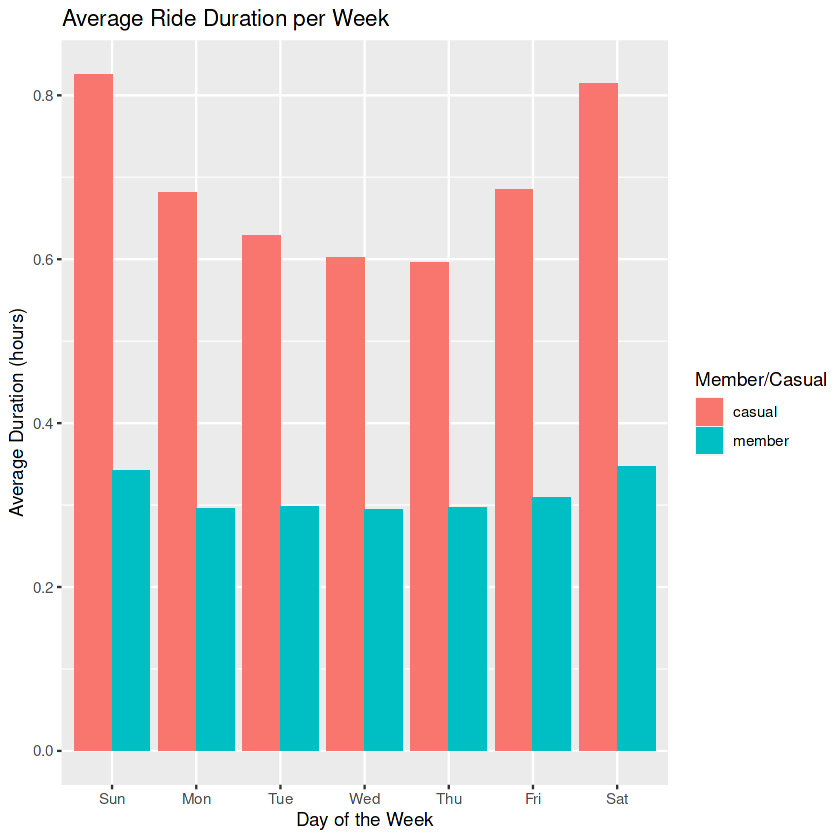
The takeaway from this plot is that casual riders are averaging at least twice the duration of rides as member riders every single day. Both members and casual riders average longer ride duration on the weekends (Fri,Sat,Sun) than the weekdays.
Lets take a look at the total number of member/casual riders per day
total_riders <- total_trips_transformed %>%
  group_by(member_casual, day) %>%
  summarise(number_of_rides = n(),
            average_duration= mean(duration_h)) %>%
  arrange(member_casual, day) %>%
  ggplot(aes(x=day,y=number_of_rides, fill=member_casual))+
  geom_col(position = "dodge") +
  scale_y_continuous(labels = scales::comma) +
  labs(title = "Total Number of Rides per Day",
       x = "Day of the Week",
       y = "Number of Rides",
       fill = "Member/Casual")

print(total_riders)

`summarise()` has grouped output by 'member_casual'. You can override using the
`.groups` argument.
This plot shows us that members tend to have more rides during the week than the weekend, whereas the casual riders are the opposite: they take more rides during the weekend.
Lets break it down even further and compare the total rides per hour
casual_hourly <- total_trips_transformed %>%
  group_by(hour, member_casual) %>%
  summarise(number_of_rides = n()) %>%
  ggplot(aes(x = hour, y = number_of_rides, fill = member_casual)) +
  geom_bar(stat = "identity", position = "dodge") +
  labs(title = "Total Number of Rides per Hour",
       x = "Hour",
       y = "Number of Rides",
       fill = "Member/Casual") +
  theme_minimal() +
  scale_y_continuous(labels = scales::comma)

print(casual_hourly)

`summarise()` has grouped output by 'hour'. You can override using the
`.groups` argument.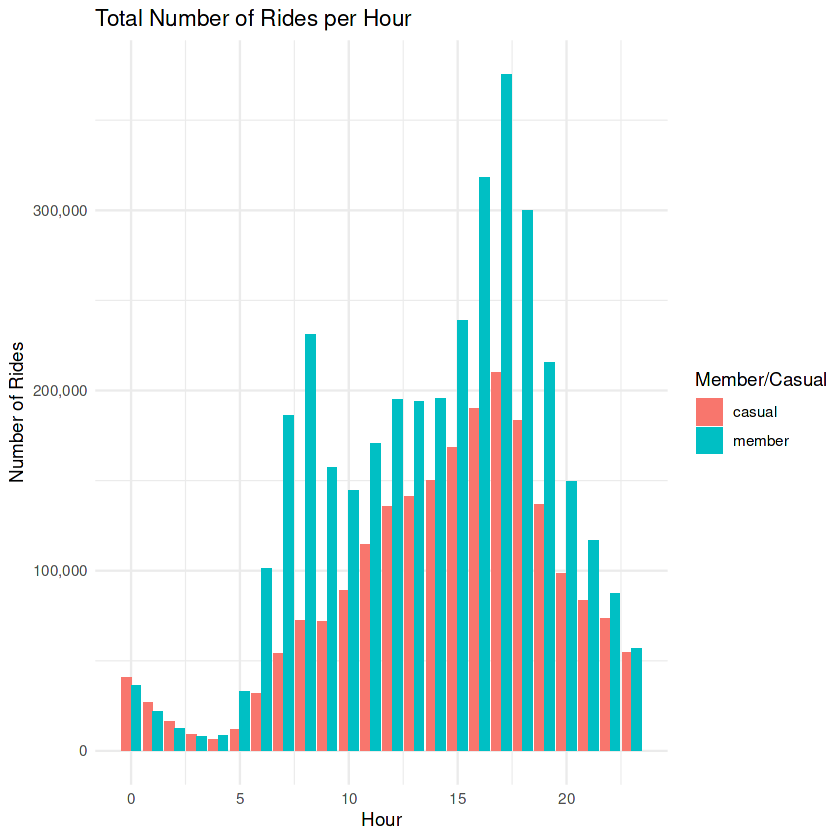
This plot shows that the peak hour for both member/casual rides is hour 17 (5:00pm) which corresponds with the end of the workday. This corresponds with leaving work or the beginning of leisure time. There is a spike in member usage early in the morning around 7:00 – 8:00 which indicates that members appear to be using the bike service to ride to work in the morning.
One last time frame we’ll take a look at is the total number of member/casual riders per month.
casual_monthly <- total_trips_transformed %>%
  group_by(month, member_casual) %>%
  summarise(number_of_rides = n()) %>%
  ggplot(aes(x = month, y = number_of_rides, fill = member_casual)) +
  geom_bar(stat = "identity", position = "dodge") +
  labs(title = "Total Number of Rides per Month",
       x = "Month",
       y = "Number of Rides",
       fill = "Member/Casual") +
  theme_minimal()+
  scale_y_continuous(labels = scales::comma)

print(casual_monthly)

`summarise()` has grouped output by 'month'. You can override using the
`.groups` argument.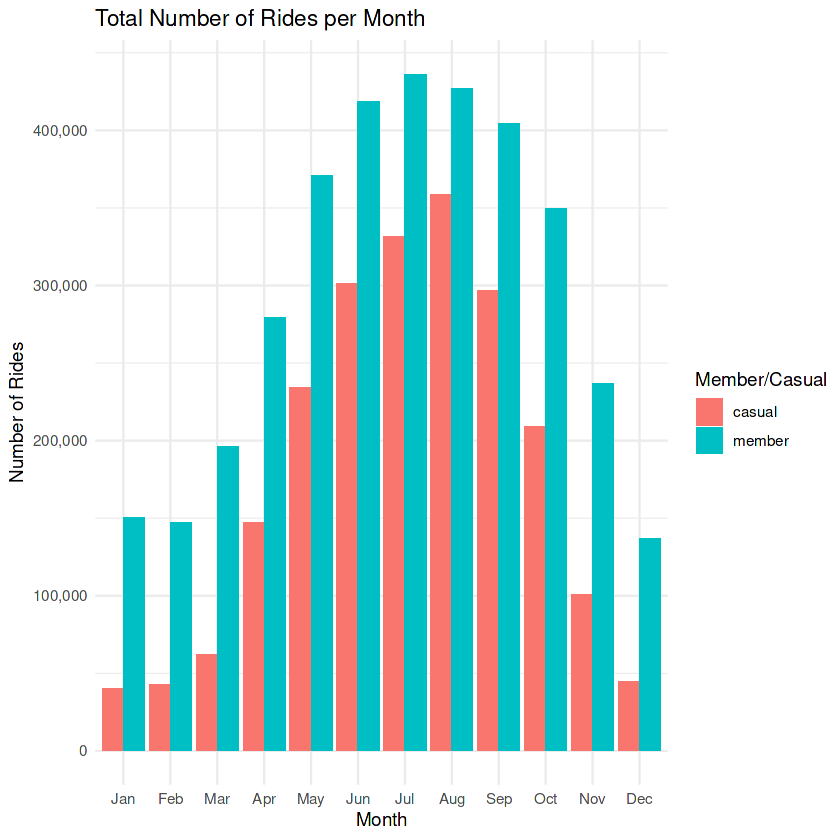
Casual and member riders experience peak season during the summer months of Jun, July, August. There is a steady decline for members and a steep decline in casual riders during the winter months of November – March.
From these total number of trips comparison we can make the following conclusions:
- Casual riders average much longer rides than members.
- Casual riders prefer to ride on weekends vs members prefer weekdays.
- Members tend to ride for work and leisure.
- Casual riders tend to ride for leisure.
- Members and casual riders prefer summer months
We can also look at ride distance. This is calculated using the distGeo() function from the geosphere package. First we’ll take a look at average distance traveled per day.
distance_month <- total_trips_transformed %>%
  group_by(month, member_casual) %>%
  filter(!is.na(ride_distance_km) | ride_distance_km != 0) %>%
  summarize(average_distance = mean(ride_distance_km)) %>%
  ggplot(aes(x = month, y = average_distance,
             color = member_casual, group = member_casual)) +
  geom_line() +
  labs(title = "Average Distance per Month",
       x = "Month",
       y = "Average Distance",
       color = "Member/Casual") +
  theme_minimal()

print(distance_month)

`summarise()` has grouped output by 'month'. You can override using the
`.groups` argument.
Both members and casual riders follow similar trends for the average distance traveled per month. Members experience a slight jump in rides at the beginning of November but no distinctive conclusions can be made from this plot.
distance_day_line <- total_trips_transformed %>%
  group_by(day, member_casual) %>%
  filter(!is.na(ride_distance_km) | ride_distance_km != 0) %>%
  summarize(average_distance = mean(ride_distance_km)) %>%
  ggplot(aes(x = day, y = average_distance, color = member_casual,
             group = member_casual)) +
  geom_line() +
  labs(title = "Average Distance per Day",
       x = "Day",
       y = "Average Distance",
       color = "Member/Casual") +
  theme_minimal()

print(distance_day_line)

`summarise()` has grouped output by 'day'. You can override using the `.groups`
argument.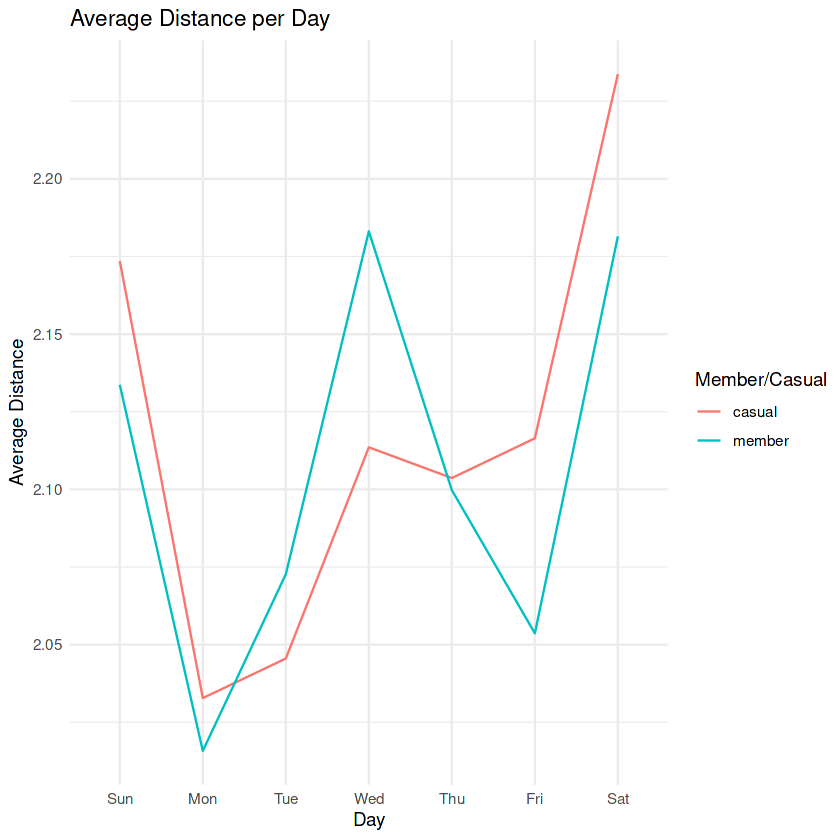
If we zoom into the average distance traveled per day, we can see again that casual riders tend to travel further than members on the weekends. Members peak average occurs on Wednesday.
Finally, we will look at the average distance traveled per hour.
distance_hour_line <- total_trips_transformed %>%
  group_by(hour, member_casual) %>%
  filter(!is.na(ride_distance_km) | ride_distance_km != 0) %>%
  summarize(average_distance = mean(ride_distance_km)) %>%
  ggplot(aes(x = hour, y = average_distance, color = member_casual)) +
  geom_line() +
  labs(title = "Average Distance per Hour",
       x = "Hour",
       y = "Average Distance",
       color = "Member/Casual") +
  theme_minimal()

print(distance_hour_line)

`summarise()` has grouped output by 'hour'. You can override using the
`.groups` argument.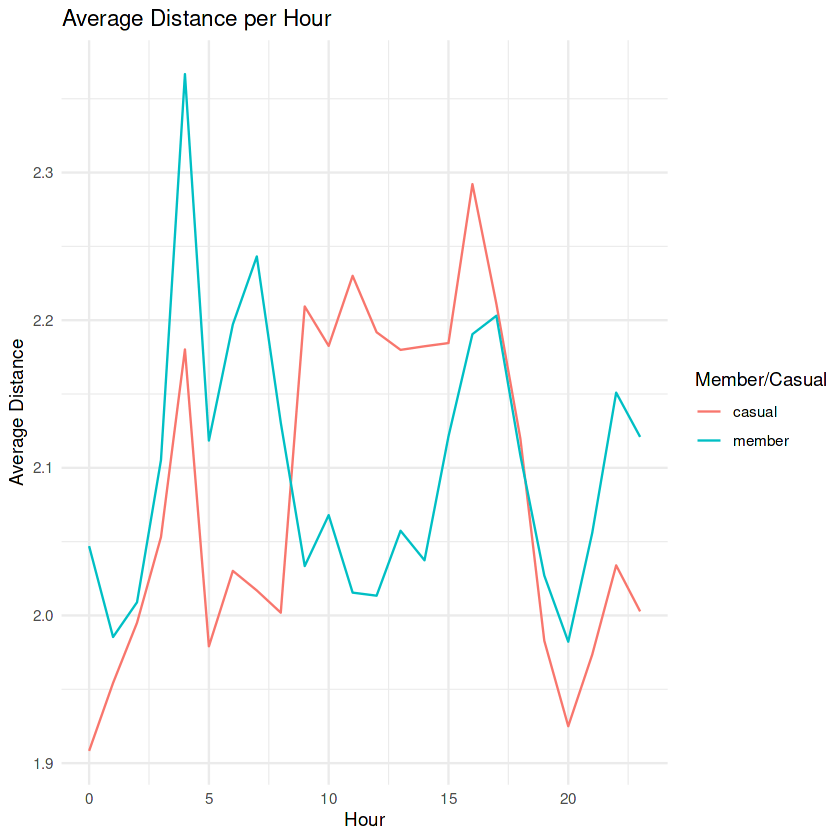
This plot gives us more information since there divergence between members and causal riders.
From these distance comparison we can make the following conclusions:
- Casual riders make longer rides on weekends
- Members make longer rides early mornings and late nights.
- Casual riders make longer rides during the hours of 10:00am – 4:00pm
Next we can take a look at the bike preferences for members and casual riders. There are three different types of bike that Cyclistic offers: Classic, Electric, Docked.
pie_chart_member <- total_trips_transformed %>%
  filter(member_casual == "member") %>%
  group_by(rideable_type) %>%
  summarise(count = n()) %>%
  mutate(percentage = count / sum(count) * 100) %>%
  arrange(desc(percentage)) %>%
  mutate(position = cumsum(percentage) - percentage / 2) %>%
  ggplot(aes(x = "", y = percentage, fill = rideable_type)) +
  geom_bar(stat = "identity", width = 1, position = position_stack(vjust = 0.5),
           color = "white") +
  geom_text(aes(label = ifelse(percentage %in% c(0, 25, 50, 100), "",
                               paste0(round(percentage), "%"))),
            position = position_stack(vjust = 0.5),
            check_overlap = TRUE,
            color = "white") +
  coord_polar(theta = "y") +
  scale_x_discrete(breaks = NULL) +
  labs(title = "Bike Type Distribution for Member Riders",
       fill = "Bike Type") +
  theme_void() +
  theme(legend.position = "right")

print(pie_chart_member)
Members do not utilize docked bikes. They split usage between electric bikes (52%) and classic bikes (48%)
pie_chart_casual <- total_trips_transformed %>%
  filter(member_casual == "casual") %>%
  group_by(rideable_type) %>%
  summarise(count = n()) %>%
  mutate(percentage = count / sum(count) * 100) %>%
  arrange(desc(percentage)) %>%
  mutate(position = cumsum(percentage) - percentage / 2) %>%
  ggplot(aes(x = "", y = percentage, fill = rideable_type)) +
  geom_bar(stat = "identity", width = 1, position = position_stack(vjust = 0.5),
           color = "white") +
  geom_text(aes(label = ifelse(percentage %in% c(0, 25, 50, 100), "",
                               paste0(round(percentage), "%"))),
            position = position_stack(vjust = 0.5),
            check_overlap = TRUE,
            color = "white") +
  coord_polar(theta = "y") +
  scale_x_discrete(breaks = NULL) +
  labs(title = "Bike Type Distribution for Casual Riders",
       fill = "Bike Type") +
  theme_void() +
  theme(legend.position = "right")

print(pie_chart_casual)
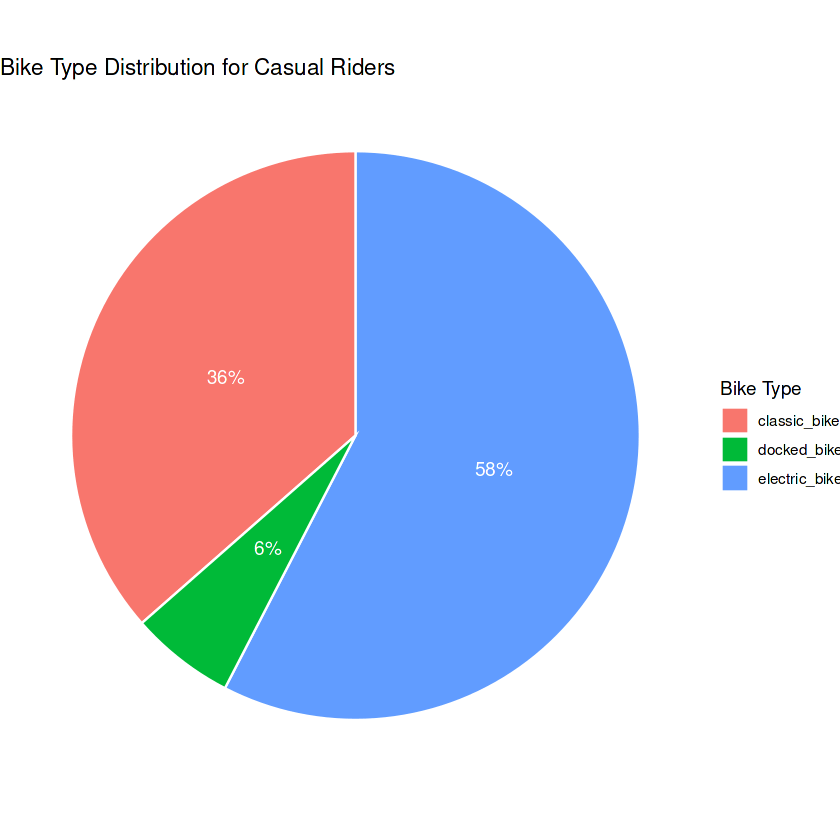
Casual riders tend to favor electric bikes with a 58% preference, while classic bikes are used 36% of the time and 6% for docked bikes.
Lastly we will take a look at the location preferences of the riders. We will output a table for the start_station and end_station preferences of members and casual riders.
top_start_stations <- total_trips_transformed %>%
  group_by(member_casual, start_station_name) %>%
  filter(start_station_name != "missing") %>%
  summarise(total_rides = n()) %>%
  arrange(member_casual, desc(total_rides)) %>%
  group_by(member_casual) %>%
  top_n(10)

print(top_start_stations)

# List the top 10 end stations
top_end_stations <- total_trips_transformed %>%
  group_by(member_casual, end_station_name) %>%
  filter(end_station_name != "missing") %>%
  summarise(total_rides = n()) %>%
  arrange(member_casual, desc(total_rides)) %>%
  group_by(member_casual) %>%
  top_n(10)

print(top_end_stations)

`summarise()` has grouped output by 'member_casual'. You can override using the
`.groups` argument.
Selecting by total_rides

# A tibble: 20 × 3
# Groups:   member_casual [2]
   member_casual start_station_name                 total_rides
   <chr>         <chr>                                    <int>
 1 casual        Streeter Dr & Grand Ave                  50025
 2 casual        DuSable Lake Shore Dr & Monroe St        30193
 3 casual        Michigan Ave & Oak St                    23119
 4 casual        Millennium Park                          22437
 5 casual        DuSable Lake Shore Dr & North Blvd       20973
 6 casual        Shedd Aquarium                           18706
 7 casual        Theater on the Lake                      16757
 8 casual        Wells St & Concord Ln                    14061
 9 casual        Dusable Harbor                           13933
10 casual        Indiana Ave & Roosevelt Rd               12346
11 member        Kingsbury St & Kinzie St                 25282
12 member        Clark St & Elm St                        23971
13 member        Clinton St & Washington Blvd             23101
14 member        Wells St & Concord Ln                    21505
15 member        University Ave & 57th St                 20876
16 member        Loomis St & Lexington St                 20525
17 member        Ellis Ave & 60th St                      19772
18 member        Wells St & Elm St                        19495
19 member        Clinton St & Madison St                  19178
20 member        Broadway & Barry Ave                     18679

`summarise()` has grouped output by 'member_casual'. You can override using the
`.groups` argument.
Selecting by total_rides
# A tibble: 20 × 3
# Groups:   member_casual [2]
   member_casual end_station_name                   total_rides
   <chr>         <chr>                                    <int>
 1 casual        Streeter Dr & Grand Ave                  52721
 2 casual        DuSable Lake Shore Dr & Monroe St        27567
 3 casual        Michigan Ave & Oak St                    24321
 4 casual        Millennium Park                          24130
 5 casual        DuSable Lake Shore Dr & North Blvd       23064
 6 casual        Theater on the Lake                      17863
 7 casual        Shedd Aquarium                           16629
 8 casual        Wells St & Concord Ln                    13586
 9 casual        Dusable Harbor                           12950
10 casual        Clark St & Armitage Ave                  12285
11 member        Kingsbury St & Kinzie St                 25487
12 member        Clinton St & Washington Blvd             24148
13 member        Clark St & Elm St                        23829
14 member        Wells St & Concord Ln                    22340
15 member        University Ave & 57th St                 21035
16 member        Loomis St & Lexington St                 20812
17 member        Clinton St & Madison St                  20242
18 member        Wells St & Elm St                        19611
19 member        Ellis Ave & 60th St                      19491
20 member        Broadway & Barry Ave                     18968
# Create a gradient color bar chart for casual riders
casual_bar_chart <- top_start_stations %>%
filter(member_casual == "casual") %>%
ggplot(aes(x = reorder(start_station_name, total_rides), y = total_rides,
fill = total_rides)) +
geom_bar(stat = "identity") + # No need to specify fill color here
scale_fill_gradient(low = "lightblue", high = "darkblue") +
labs(title = "Top Start Stations for Casual Riders",
x = "Start Station Name",
y = "Total Rides") +
theme_minimal() +
theme(axis.text.x = element_text(angle = 45, hjust = 1),
legend.position = "none") # Remove legend
print(casual_bar_chart)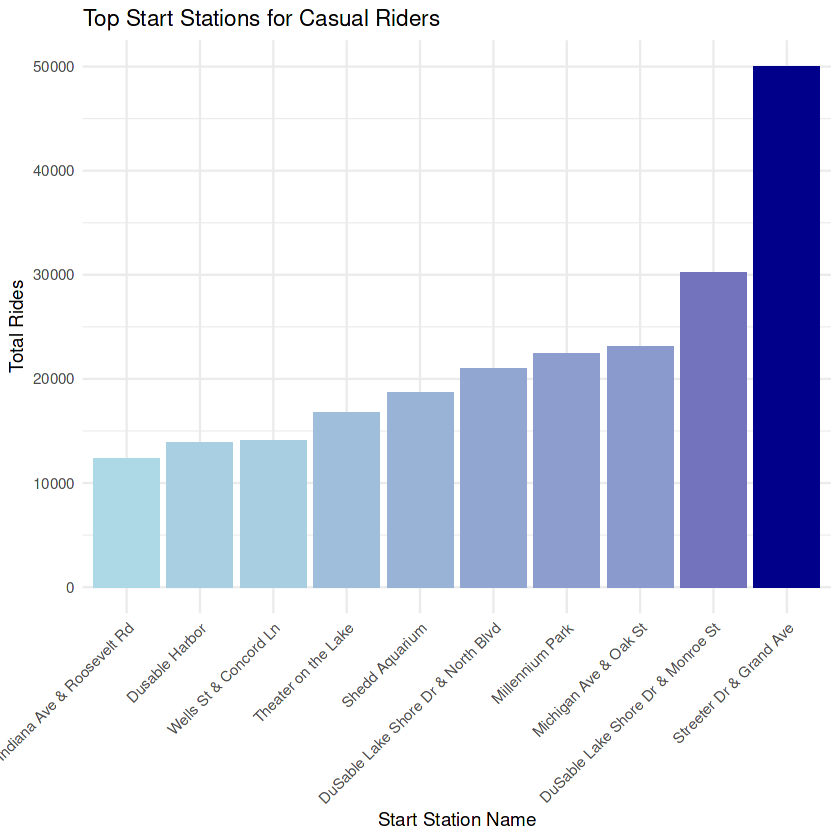
# Create a gradient color bar chart for member riders
member_bar_chart <- top_start_stations %>%
  filter(member_casual == "member") %>%
  ggplot(aes(x = reorder(start_station_name, total_rides), y = total_rides,
             fill = total_rides)) +
  geom_bar(stat = "identity") +  # No need to specify fill color here
  scale_fill_gradient(low = "peachpuff", high = "darkorange") +
  labs(title = "Top Start Stations for Member Riders",
       x = "Start Station Name",
       y = "Total Rides") +
  theme_minimal() +
  theme(axis.text.x = element_text(angle = 45, hjust = 1),
        legend.position = "none")

print(member_bar_chart)
Neither the members nor the casual riders overlap preferences for the top 5 utilized station locations. This can be very important for marketing purposes.
Casual riders have a clear preference for Streeter Dr & Grand Ave. station. Members are relatively evenly distributed among the top ten stations.
5. Share
Key Objective: Deliver supporting visualizations and key findings:
The visualizations above highlighed the following key differences between members and casual riders:
- Casual riders make up 37.9% and members make up 62.1% of the total number of rides.
- Casual riders ride longer than members.
- Casual riders ride more on weekends and members ride more on weekdays.
- Members tend to ride for work and leisure, casual riders tend to ride for leisure.
- Members make longer rides early mornings and late nights, casual riders make longer rides during the midday hours of 10:00am – 4:00pm.
- Casual riders prefer electric bikes.
- Only casual riders utilize docked bikes.
- Casual riders and member prefer to start at different stations.
- Casual riders heavily utilize Streeter Dr. & Grand Ave. station.
6. Act
Key Objective: Deliver top 3 recommendations
Based on the results from the analysis, we make the following recommendations:
- Membership promotions
- Offer special discounts or benefits for weekend trips, reaching a specific number of trips, or for hitting a number of hours traveled milestone. All of these are tailored to convert casual riders to members
- Make casual riders aware of the milestone rewards program through targeted marketing campaigns, app notifications, and clear in-app displays. Highlight the potential savings and benefits they can unlock as members when they achieve these milestones.
- Targeted Communications:
- Use targeted email, app notifications, or SMS campaigns to communicate the benefits of membership to casual riders. Geolocation data for casual riders shows heavily utilization of the Streeter Dr. & Grand Ave. station. This should be the primary target for converting casual riders.
- Create messages that highlight how membership can improve the rental experience at Streeter Dr. & Grand Ave. station. Mention benefits such as priority access to bikes at this station or extended ride durations in the area. Make it clear that membership is tailored to enhance their rides at this specific location.
- Station-Specific Feedback Surveys
- Conduct station-specific feedback surveys at the most frequently used casual rider stations, with a focus on Streeter Dr. & Grand Ave. station, to gather insights on the factors that would motivate casual riders to convert to members.
- By directly engaging with casual riders at their preferred stations, Cyclistic can gain valuable feedback tailored to the needs and preferences of riders in specific locations. These surveys can help uncover station-specific pain points, identify desired benefits, and gather suggestions for membership incentives. The insights collected can inform targeted conversion strategies and enhance the overall rider experience.
Conclusion
To recap, these recommendations were developed through the use of data-driven insights generated from in-depth data analysis and visualization. This enabled us to present a convincing strategy that is in line with the priorities of our stakeholders and positions Cyclistic for growth and profitability. We expect that these strategic initiatives will resonate with our stakeholders, leading to a growth in membership and, ultimately, the achievement of our business goals.
 Joshua Lamothe